New BasicSwap AMM UI: A Giant Leap in Usability
We're pleased to announce the official integration of BasicSwap's companion market making tool (AMM) directly into the user interface. This release, which also includes advanced trade and order management features contributed by the community, marks a significant advancement in the BasicSwap platform's user experience and ease of use.
This new feature is part of BasicSwap's new v0.14.6 release, which you can get by updating your BasicSwap client to the latest version.
This blog post will detail the functionality of this new user interface feature and how to leverage its capabilities for effective, low-effort, and low-maintenance liquidity provision. By the end, you'll have a comprehensive understanding of liquidity provision on BasicSwap.
Origins of the AMM Tool
The automated market-making (AMM) tool originated more than two years ago as a standalone script for BasicSwap, designed to run in parallel with the DEX.
From its initial release, the script offered two crucial functionalities not readily available through the user interface: the automatic republication of offers upon expiry and the automatic adjustment of offer rates based on current market prices, with the option to add a premium.
Unfortunately, the additional steps required to operate the AMM tool limited its adoption to a select few. Consequently, the majority of BasicSwap users missed out on its user experience benefits, often due to perceived complexity or a lack of awareness regarding its existence.
The introduction of the AMM page into the user interface addresses this issue directly, representing a substantial step towards making BasicSwap more intuitive and user-friendly.
New AMM Page Overview
Today's release introduces the dedicated AMM page within the user interface. This page incorporates all functionalities from the original companion script, alongside additional quality-of-life features. These include:
- Automatic republication of offers on the order book upon expiry.
- Automatic adjustment of offer rates based on the market price of each coin (a configurable percentage above or below market price).
- Automatic adjustment of offer sizes (amount of coins offered) when previous offers are partially filled.
- The ability to execute fill-or-place limit orders.
- Automatic startup of the AMM tool with BasicSwap.
- Configuration of AMM settings directly from the user interface.
- Selection of swap type (Secret Hash or Adaptor Signature).
- Selection of the method used to determine automatic price adjustments.
Let's delve into some of these features for a clearer understanding of their purpose and operation.
Automatic Republication of Offers
A critical feature of this new integration is its ability to automatically republish offers once they expire. To appreciate its significance, you must first understand that BasicSwap offers have a set expiration time, a limitation of SMSG free P2P messages. This historically required you to re-enter BasicSwap and manually publish new offers each time they expired.
With the new AMM integration, this manual process is obsolete. You can now set your offers directly within the tool and configure them for automatic republication upon expiry.
However, market prices may fluctuate, and other swappers may have already partially filled your offers. This makes the next two features as important as automatic offer republication.
Automatic Price Adjustments
This feature automatically adjusts your offer's rate based on the current market price of both coins in the pair. For instance, if you're offering Litecoin for Monero, the price of the Litecoins you're offering will be automatically adjusted based on the current market price of Litecoin.
To determine the market rate, you can choose from various methods, including fetching the CoinGecko price (via API), the best rate of auto-accept offers on BasicSwap's own order book (no external connection), or different combinations of these, including a static and/or fixed minimum rate.
Additionally, you can set a premium on the market rate, which means any percentage above or below the market rate. This allows you to automatically set offers that guarantee a profit margin over the market rate at the time the offer was published, significantly improving the intuitiveness and viability of profitable market-making operations on BasicSwap.
Automatic Offer Size Adjustments
While automatic offer republication and price adjustments are crucial for viable market making on BasicSwap, a third feature — the automatic adjustment of offer sizes — is also essential. The rationale is straightforward: if you have a set inventory of Litecoin to offer for Monero, for example, your offers need to reflect the remaining inventory after partial fills. If you start with 100 Litecoins and someone takes 20 Litecoins via a partial swap, you're left with 80 Litecoins. Consequently, the next time your offer is automatically republished, it needs to account for this reduced inventory.
Fortunately, once you configure your "Offer Size Increment" parameter, the AMM manages this entire process seamlessly in the background. This ensures that your republished offers accurately reflect your initial target (e.g., 100 Litecoins) while accounting for past partial fills. This effectively makes BasicSwap offers behave almost identically to orders placed on a centralized exchange, a critical user experience improvement that makes atomic swaps on BasicSwap even more intuitive.
Fill-or-Place Limit Orders
The AMM tool now introduces a significant improvement in usability through its "fill-or-place limit order" functionality on the order book. This capability is facilitated by the Bids function, which is currently categorized as an experimental feature.
While the AMM's primary role is to automatically place dynamic offers on the order book, an additional feature can be enabled to allow the AMM to also place bids at a desired rate. A notable aspect of this feature is its behavior when a bid's size exceeds the available quantity at a specific rate. In such cases, the AMM will initiate a bid to fill the existing offer, then immediately place a new limit offer equal in size to the remaining amount of your initial bid.
For illustration, consider a scenario where you aim to acquire 10 Monero for 10 Litecoin at a 1.0 ratio, and an existing offer for 5 Monero for 5 Litecoin is available at that rate. The AMM will first execute a bid to accept the entire 5 Monero from the available offer. Subsequently, it will place a new limit offer at the same rate for the remaining 5 Monero, thereby fulfilling your total desired acquisition of 10 Monero.
This process provides a streamlined method for users to efficiently acquire or divest assets by leveraging existing liquidity at their desired rate, while also contributing to the order book with any unfulfilled portions of their request.
As this new feature is still under experimental status, it requires manual activation. To enable it, navigate to your Settings page and, within the General tab, activate both debug and debug_ui. As we gather more user feedback and testing data, this feature will eventually be integrated into the stable set of functionalities, removing the need for manual activation.
AMM User Interface Breakdown
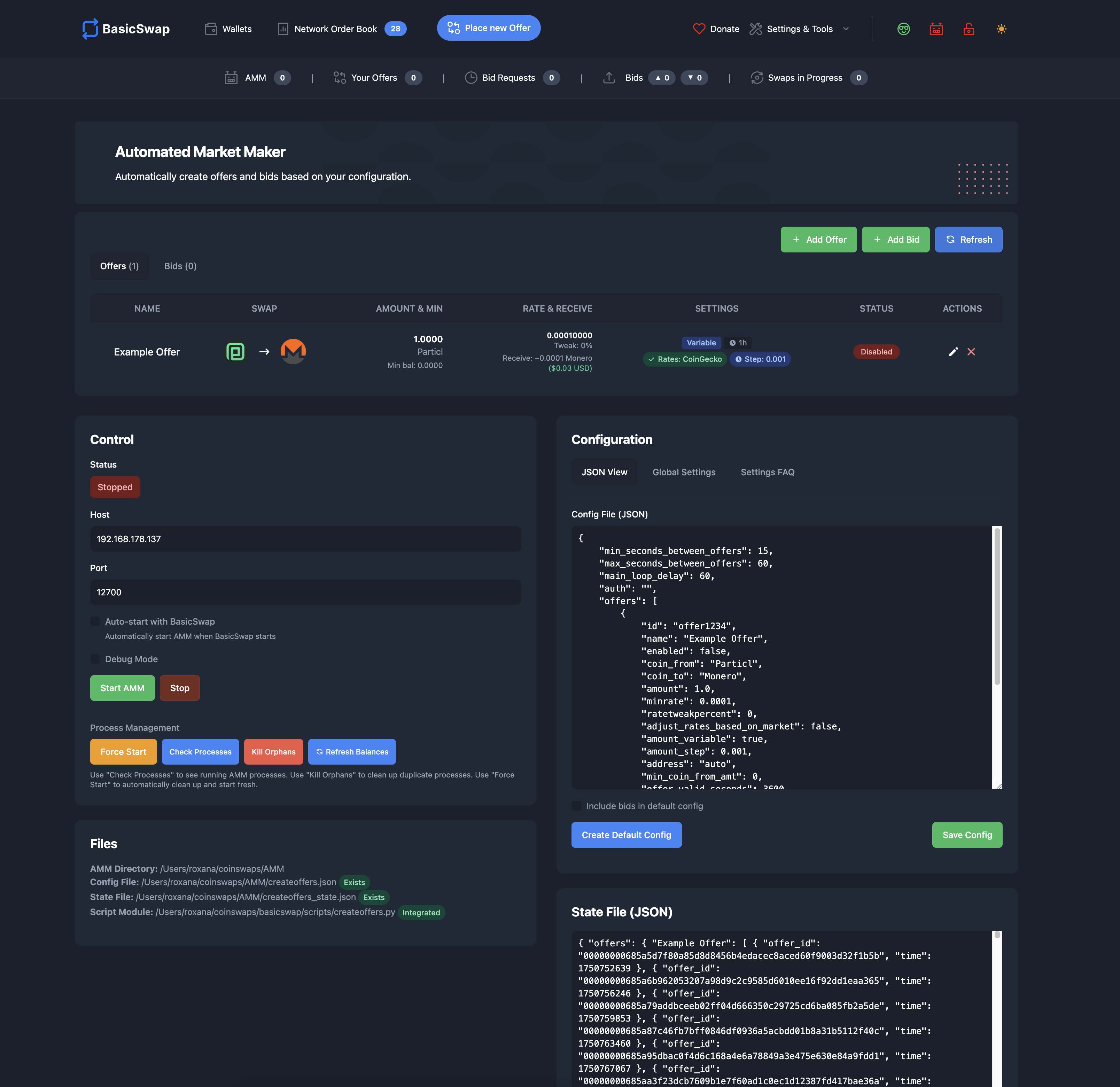
Now that we've covered the most notable features, let's explore how they are integrated within the user interface.
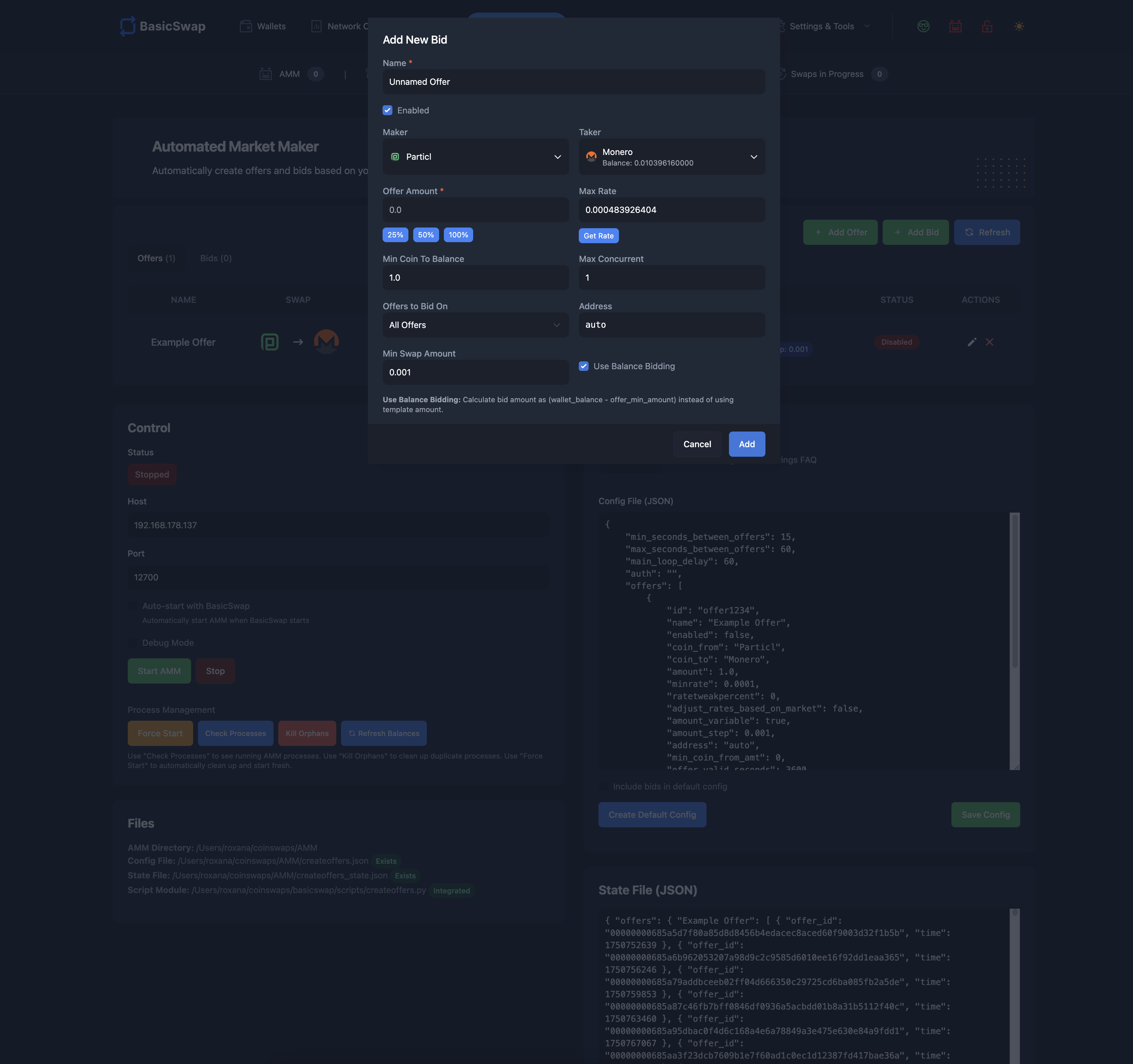
Main Screen
| Component | Description |
|---|---|
| Offers Table | A table displaying all your offers, indicating whether they are enabled or disabled. This table also shows what are this offer’s main parameters. |
| Create New Offer | Option to create new automatic offers. |
| Refresh Button | Function to refresh the offer table with the most recent information (e.g., updated offer sizes and rates after republication). |
| Edit/Remove Options | Options to edit or remove an offer. |
| AMM Control Center | Control center for the AMM tool, enabling you to start or stop automatic offers. |
| Global Configuration | Configuration section of the page, allowing modification of global AMM parameters. |
Create a New Offer
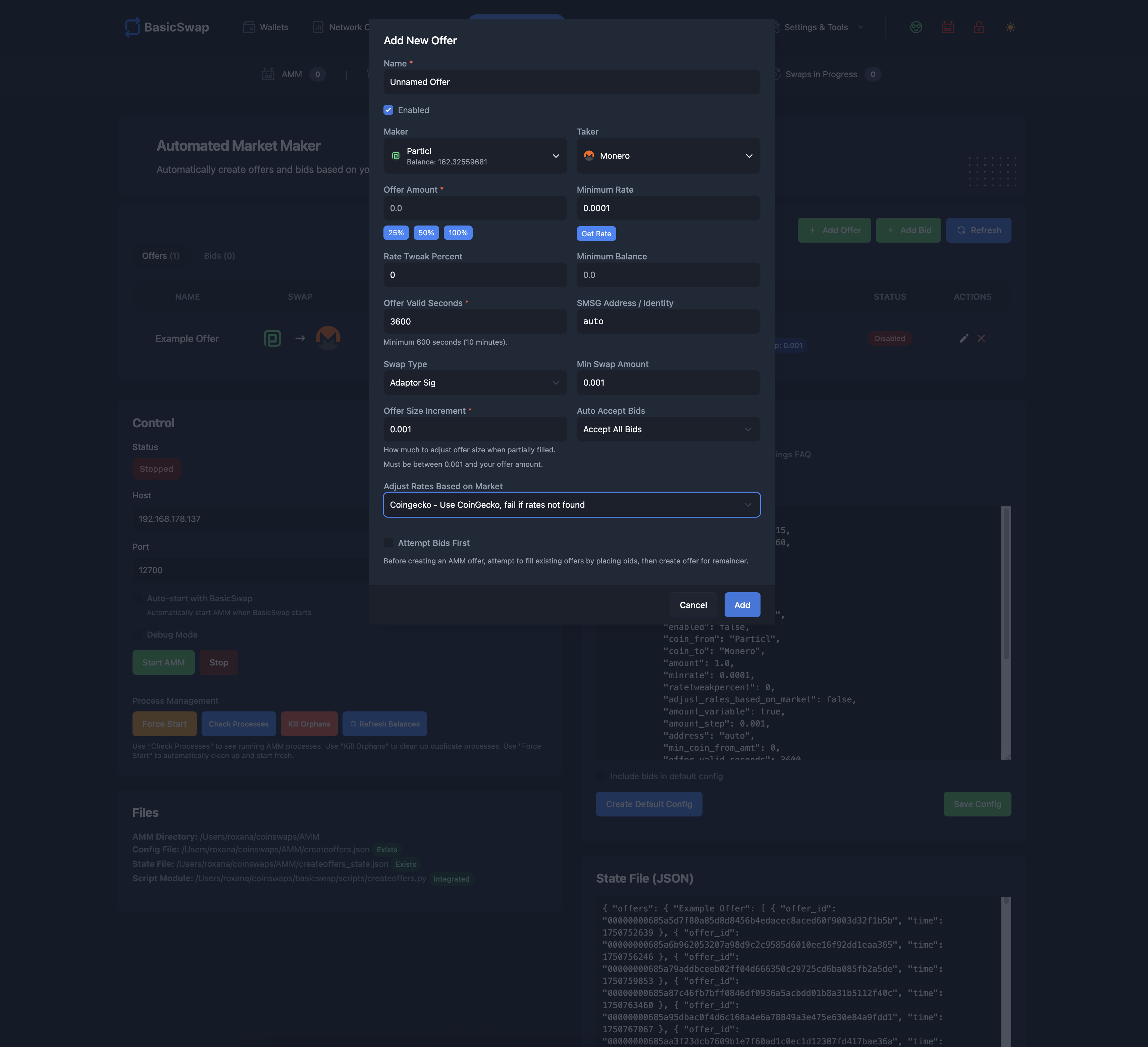
| Parameter | Description |
|---|---|
| Local Name/Label | A private identifier for your offer, not visible to others. |
| Enable/Disable Offer | Controls whether your offer is active. Disabled offers will cease republication upon expiry. |
| Maker Coin | The cryptocurrency you intend to offer (you are the "maker" in this context). |
| Taker Coin | The cryptocurrency you wish to obtain in exchange for the maker coin. |
| Total Offer Amount | The total quantity of the maker coin you are offering for this specific offer. Partial fills will reduce this amount in subsequent republications. |
| Minimum Rate | The absolute lowest rate at which you are willing to sell your coins. This protects against significant price depreciation, especially when automatic price adjustments are enabled. |
| Rate Tweak Percentage | Determines the percentage above or below the market price at which your offer will be published. For example, a setting of "1" when selling Monero at a $330 USD market price would result in an offer price of $333 USD ($330 + 1%), ensuring a $3 profit margin over the market price at the time of the offer’s publication. |
| Minimum Wallet Balance | The minimum balance required in your coin's wallet for the offer to continue being republished. |
| Offer Expiry Time (seconds) | Defines how long your offer remains on the order book before automatic republication. A shorter duration results in more frequent rate updates. |
| SMSG Identity | Selects the SMSG identity to publish your offer from. This can be randomized for new offers (auto), with the same identity reused upon republication. |
| Swap Protocol | Determines the swap protocol for your offer. Note that compatibility may limit choices for certain pairs. |
| Minimum Bid Amount | The minimum number of coins required for a bid (swap request on your offer) to be automatically accepted. |
| Offer Size Adjustment Precision | Determines the precision of offer size adjustments after a partial fill. |
| Coin Rate/Price Calculation Method | Controls how coin rates/prices are determined. Selecting "Static" disables automatic price adjustments and uses the "Minimum Rate" plus "Rate Tweak Percentage." |
Create a Bid
| Parameter | Description |
|---|---|
| Local Name/Label | A private identifier for your offer, not visible to others. |
| Enable/Disable Offer | Controls whether your offer is active. Disabled offers will cease republication upon expiry. |
| Maker Coin | The cryptocurrency you intend to offer (you are the "maker" in this context). |
| Taker Coin | The cryptocurrency you wish to obtain in exchange for the maker coin. |
| Total Offer Amount | The total quantity of the maker coin you are offering for this specific offer. Partial fills will reduce this amount in subsequent republications. |
| Maximum Rate | The absolute highest rate at which you are willing to put a bid for. This protects against significant price appreciation which may fall outside of your desirable range. |
| Minimum Coin to Balance | The minimum balance required in your coin's wallet for a bid to be placed. |
| Max Concurrent | Maximum number of active bids at once. |
| Offers to Bid On | Filter offer types on which a bid can be placed: "auto_accept_only" (only auto-accept offers, default), "all" (any offer), "known_only" (known identities only). |
| SMSG Identity | Selects the SMSG identity to publish your offer from. This can be randomized for new offers (auto), with the same identity reused upon republication. |
| Minimum Swap Amount | The minimum number of coins required for a swap to take place. |
| Use Balance Bidding | Automatically calculates the bid size by taking your total coin balance and subtracting the offer’s minimum amount to it. |
Overarching Goal with the AMM UI
At BasicSwap, our mission is to make atomic swaps ubiquitous in cryptocurrency trading. While their security and privacy benefits are unparalleled, they typically come with user experience drawbacks. Our ongoing efforts are focused on eliminating these drawbacks.
This significant user experience update is a crucial step forward in that mission, making the platform considerably more accessible for market makers and users seeking to publish dynamic offers without unnecessary complexity.
Furthermore, this update lays the groundwork for broader enhancements and additions we plan to integrate into the DEX. These include a more user-friendly order book system with clear buy and sell tables and depth charts, as well as smarter, more intuitive methods for taking offers.
Stay tuned as we continue to push boundaries, making secure, private, and free trading more accessible than ever.
Stay Connected
Stay connected with us on our social media channels for real-time updates, news, and more.
- Twitter: @basicswapdex
- Matrix: BasicSwap channel
- GitHub: BasicSwap repositories
- Support the project: Donation page
BasicSwap Team
The official team behind BasicSwap. We're a group of passionate contributors dedicated to making atomic swap technology ubiquitous by creating accessible, user-friendly solutions for everyone.
Related Posts
BasicSwap v0.19.0: Smart Buy, Nostr Messaging, and More Reliable Swap Accepts
By BasicSwap Team on October 4, 2026
BasicSwap v0.19.0 adds Smart Buy in beta, batched swap funding, Nostr messaging and a Networks settings tab, updates SimpleX Chat and Firo, and fixes repeated swap accepts.
BasicSwap v0.18.10: More Price Oracles, Safer Rate Handling, and Swap-Scan Fixes
By BasicSwap Team on September 30, 2026
BasicSwap v0.18.10 adds six price sources, per-source rate-limit handling and stale-rate checks, fixes watched-output and Decred lock-output scans, and updates Particl Core.
BasicSwap v0.18.6 through v0.18.9: Swipe-Payout Recovery, Wallet Fixes, and WebSocket Hardening
By BasicSwap Team on September 16, 2026
Four BasicSwap releases that add swipe-payout recovery when no mercy transaction is sent, tighten WebSocket handling, fix wallet and Electrum edge cases, and update Litecoin and Particl Core.